Table of Contents
Introduction
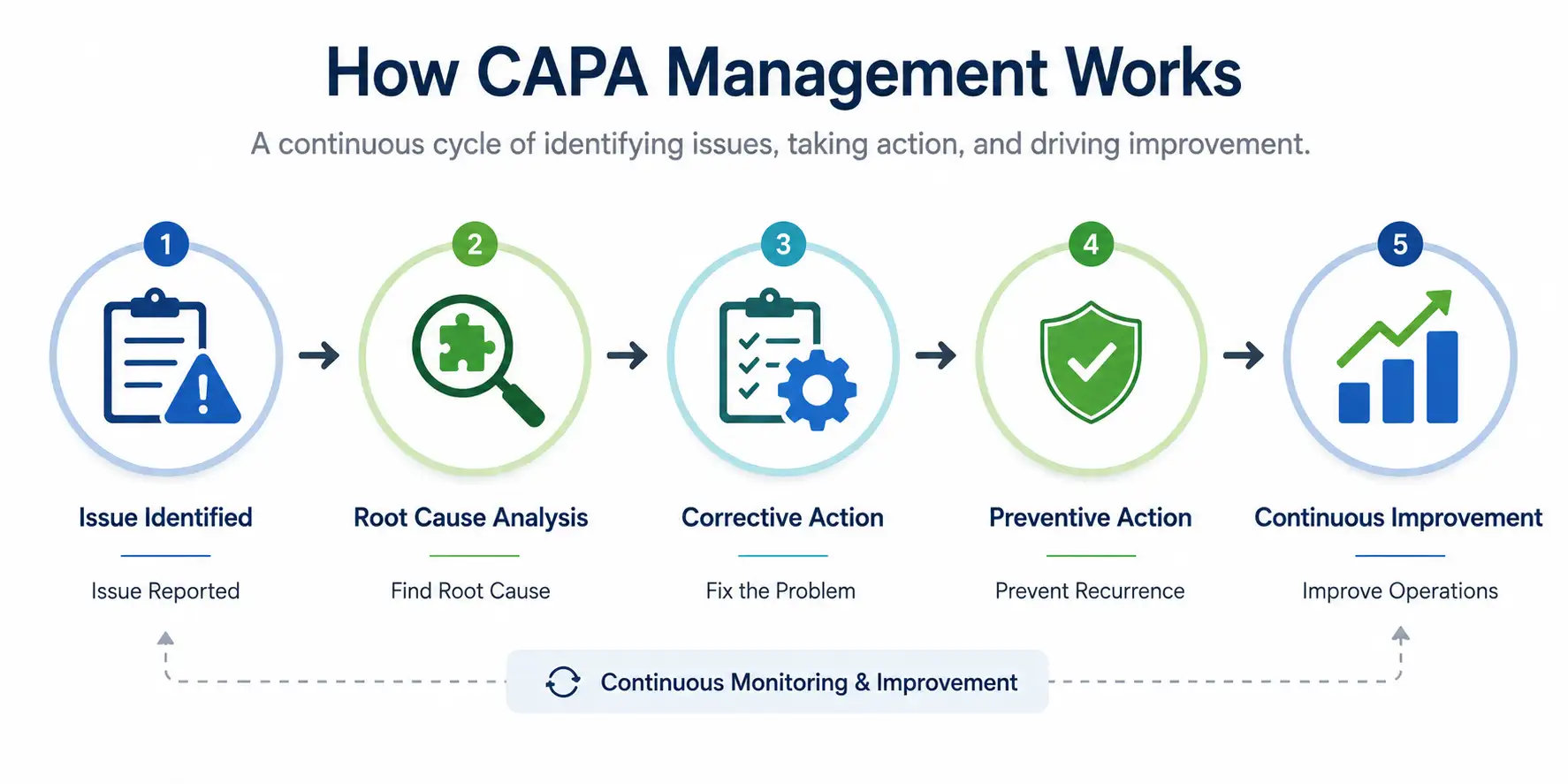
CAPA (Corrective and Preventive Action) is the one of the most effective approaches to improving operations in all organizations. Whether it’s a workplace safety incident, a customer complaint, a quality defect, an equipment failure, or an audit non-conformance, CAPA aims at identifying the root cause, implementing corrections, preventing reoccurrences, and improving work process.
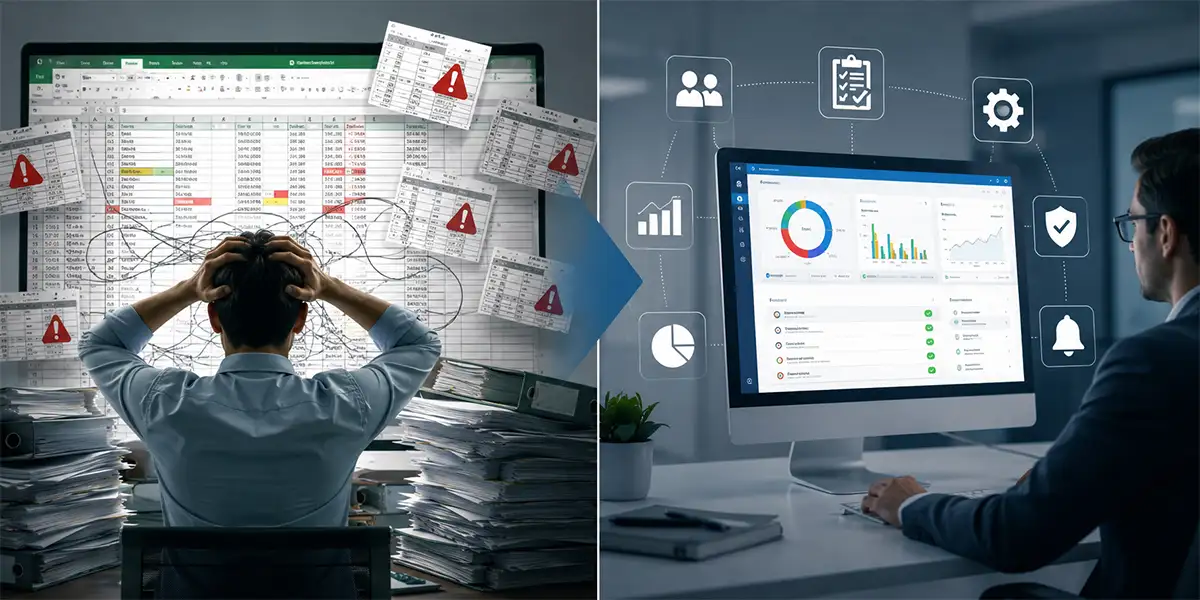
The most commonly used approach for managing CAPA is EXCEL. It is inexpensive, easy to use, and readily available. In the presence of only a few CAPAs, a spreadsheet seems to be a good way of keeping track of the actions. However, when organizations grow and have a many factories, departments, subcontractors and other agencies involved, the impact becomes very clear:
At this scale, Excel shifts from being a helpful tracking tool to becoming a major operational bottleneck. Hence, a CAPA Management Software becomes a necessity.
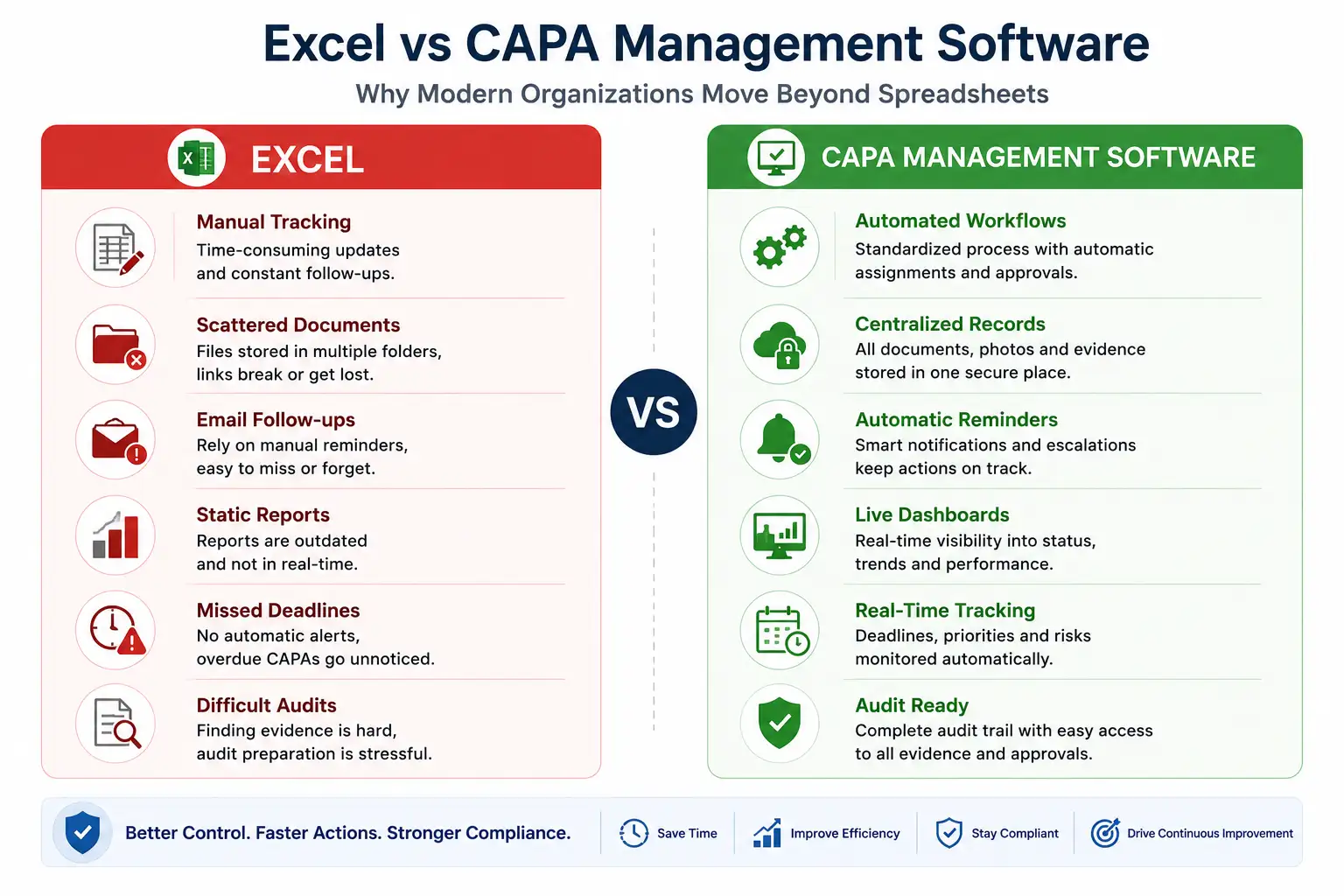
Below are Nine most common challenges organizations experience when relying on Excel for CAPA management and how modern CAPA software addresses them.
1. Before-and-After Evidence Reconciliation Is Almost Impossible for Audit Preparation
A critical aspect of CAPA is providing clear evidence that corrective actions have been completed and are effective. This usually requires before-and-after photos, inspection reports, calibration certificates, revised procedures, training records, or other supporting evidence. Excel, however, is not designed to manage or organize this type of evidence. Often, photos are stored in shared folders, while the spreadsheet contains only links or file names. As files are moved, renamed, or deleted over time, these links can become invalid. During an audit, locating the correct evidence for a CAPA can take hours or, in some cases, impossible.
Building the Audit Trail Into the Record Itself
CAPA system software stores all supporting documents, photographs, approvals, and evidence within the CAPA record, creating a complete and tamper-proof audit trail. Every document is linked to the corresponding action, making verification quick, reliable, and audit ready. Thus, Audit preparation becomes significantly easier, evidence is never misplaced, and organizations can confidently demonstrate that corrective actions have been completed effectively.
2. One Person Ends Up Spending Most of Their Time Tracking CAPAs
In many organizations, one Quality Manager, EHS Officer, or CAPA Coordinator takes on the responsibility of monitoring every corrective action. Instead of focusing on quality improvement, they spend their day coordinating with department heads, sending reminder emails, updating spreadsheets, and preparing status reports. As the number of CAPAs increases, tracking them manually becomes a full-time job.
Taking the Follow-Up Off One Person’s Plate
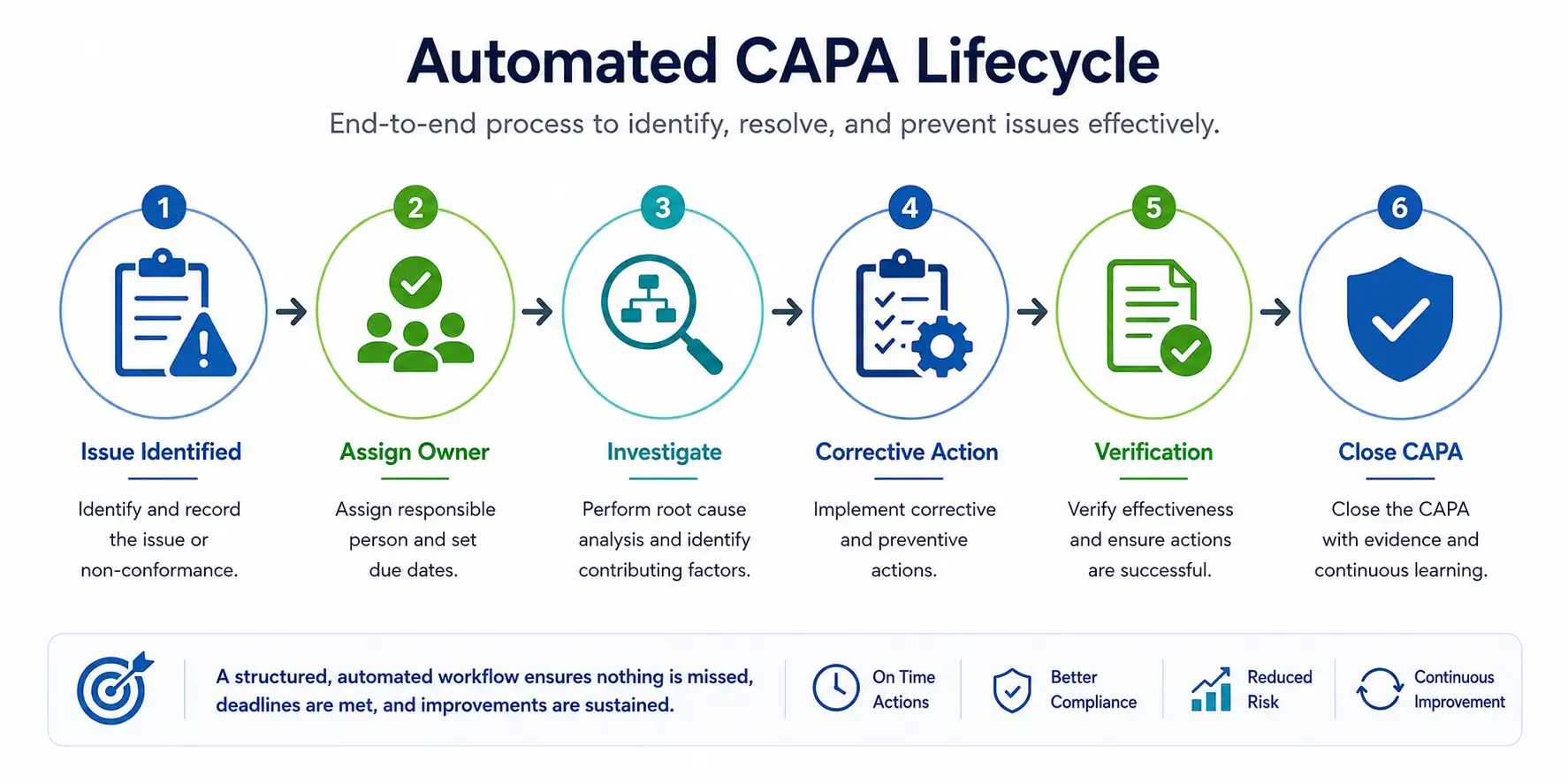
CAPA software can automatically assign tasks, send reminders, and notify responsible users without requiring manual follow-up.
CAPA Management Software frees Quality Managers, EHS Officers, and CAPA Coordinators from manual follow-ups, allowing them to concentrate on root cause investigations and improving business processes.
3. Department Heads Don’t Get an Accurate Status of Their Own CAPAs
Department managers need instant visibility into:
With Excel, department-wise reports are usually created manually, often once a week or once a month. As a result, the managers make decisions based on outdated information instead of the current status.
Giving Managers a Live View Instead of a Weekly Snapshot
Role-based dashboards in CAPA Software System allow each department head to view only their team’s CAPAs in real time, including due dates, priorities, pending approvals, and completion status.
Managers can proactively resolve delays instead of discovering them after deadlines have already passed with the help of CAPA Software.
Additionally, the CAPA software can automatically generate weekly summaries of pending and overdue action items and email them to the department head, enabling timely review and appropriate follow-up.
4. Escalation of Long-Overdue CAPAs Becomes a Nightmare
Excel does not automatically escalate overdue actions. Organizations depend on manual reminder emails or review meetings to identify delayed CAPAs. Critical issues may remain overdue for months simply because no one noticed.
Field Example:
In a pharmaceutical company, repeated failures in tablet dissolution test were noticed. Multiple CAPAs were identified out of which a CAPA was assigned to the Production Manager with a 45-day completion deadline. The Production Manager went on extended leave. As the CAPA was tracked in an excel and no automated reminders or escalation process existed, the CAPA remained overdue for more than two months. No one realized that the ownership needed to be reassigned.
During an internal audit, the overdue CAPA was discovered and the company received an audit observation for ineffective CAPA management and had to implement an urgent remediation plan.
Without automated escalation, overdue CAPAs can remain unnoticed until an audit or inspection reveals the problem.
Making Sure No CAPA Depends on One Person Remembering
Dedicated CAPA Software can automatically send reminder emails and escalate overdue actions based on predefined business rules. Notifications can be sent to supervisors, department heads, plant managers, and senior leadership until actions are completed.
High-risk CAPAs can receive immediate attention from management, reducing operational and compliance risks.
5. C-Level Executives Don’t Have Real-Time Compliance Visibility
Senior executives rarely review CAPA individually. Instead, they need answers to questions like:
Excel cannot provide this information in real time.
Reports are typically prepared manually usually under time pressure before a board or leadership meeting.
Answering the Board’s Questions Before They’re Asked
The Executive Dashboard in CAPA Management Software shows live compliance metrics across all business units, locations, and departments.
Leadership gains instant visibility into organizational risk and can make quicker strategic decisions.
6. Heat Maps and Trend Analysis Are Difficult to Generate
A value addition of CAPA tracking would be the ability to recognize recurring issues allowing organizations to address them before they grow into bigger problems. Organizations should be able to easily identify:
Excel complicates this analysis, especially when thousands of records exist.
Turning Scattered Records Into Patterns Worth Acting On
With CAPA Management Software, organizations can automatically generate Heat Maps, Trend Reports, Pareto Charts, and Root Cause Analytics from the department and location levels up to the corporate level.
In this way, organizations transition from reactive problem-solving to proactive risk management.
7. Lessons Learned from Previous CAPAs Are Difficult to Access
Organizations invest considerable time and effort identifying root causes and implementing corrective actions. However, when this information is stored only in spreadsheets, it often becomes difficult to retrieve and reuse. Over time, valuable knowledge remains buried in old files that become difficult to access, resulting in wasting of valuable time and resources and delaying the implementation of effective corrective actions.
For example, when a similar incident occurs months or years later, teams may be unaware that the issue has been investigated before. They end up repeating the same analysis, spending additional time and resources to arrive at the same conclusions.
Making Past Investigations Findable, Not Just Filed
CAPA Management Software helps keep valuable learning in one place instead of letting it get lost in old files and spreadsheets. All past incidents, root cause investigations, corrective actions, and effectiveness checks can be easily stored, searched, and accessed when needed.
When a similar issue happens again, teams can quickly look back at previous cases, understand what caused the problem, and see what actions worked before. This saves time, avoids repeating the same investigations, and helps the organization continuously learn, improve, and prevent recurring issues.
8. Contractor Actions Are Extremely Difficult to Monitor
Many CAPAs require support from contractors, suppliers, or service providers to complete the necessary actions. However, keeping track of their progress through Excel becomes difficult, as updates are often shared through emails, phone calls, and meeting discussions.
With excel, it becomes challenging for departments to
This can result in difficulty ensuring that action items are completed on time.
Getting Contractor Status Without Chasing Phone Calls
Corrective Action Tracking Software lets contractors receive assigned tasks, update progress, upload evidence, and complete actions with controlled access and approval workflow.
This helps improve contractor accountability while reducing project delays.
9. On-Hold CAPAs Linked to CAPEX Are Easily Forgotten
Some corrective actions require significant capital investment and cannot be implemented immediately. These may include
As a result, these CAPAs are often placed On Hold until CAPEX approval is obtained.
When CAPAs are managed in Excel, there is no structured mechanism to periodically review, track, or remind stakeholders about these pending actions.
Over time, they lose visibility, remain unresolved for months, and increase the risk of recurring incidents, compliance issues, and costly operational disruptions.
Keeping ‘On Hold’ From Quietly Becoming Forgotten
CAPA Management Software helps organizations ensure that important corrective actions do not get forgotten simply because they are waiting for CAPEX approval. Instead of being buried in spreadsheets, on-hold CAPAs remain visible with clear details such as the reason for the delay, responsible person, required approvals, and next review date.
The system can automatically remind the right people about pending actions and help managers keep track of CAPAs that are waiting for funding or approval. This makes it easier to identify actions that have been on hold for too long and take the necessary steps to move them forward.
By keeping these CAPAs visible and actively monitored, organizations can avoid delays, prevent recurring incidents, and ensure that critical improvements are completed when required.
Example:
For the construction project site that identified the need for permanent guardrails at particular locations due to long term project duration, the CAPA could be recorded as “On Hold – Awaiting CAPEX Approval” with an assigned owner and follow-up date. Regular reminders would ensure that the action continues to receive attention until approval is received and the safety improvement is completed, rather than being forgotten in an Excel tracker.